
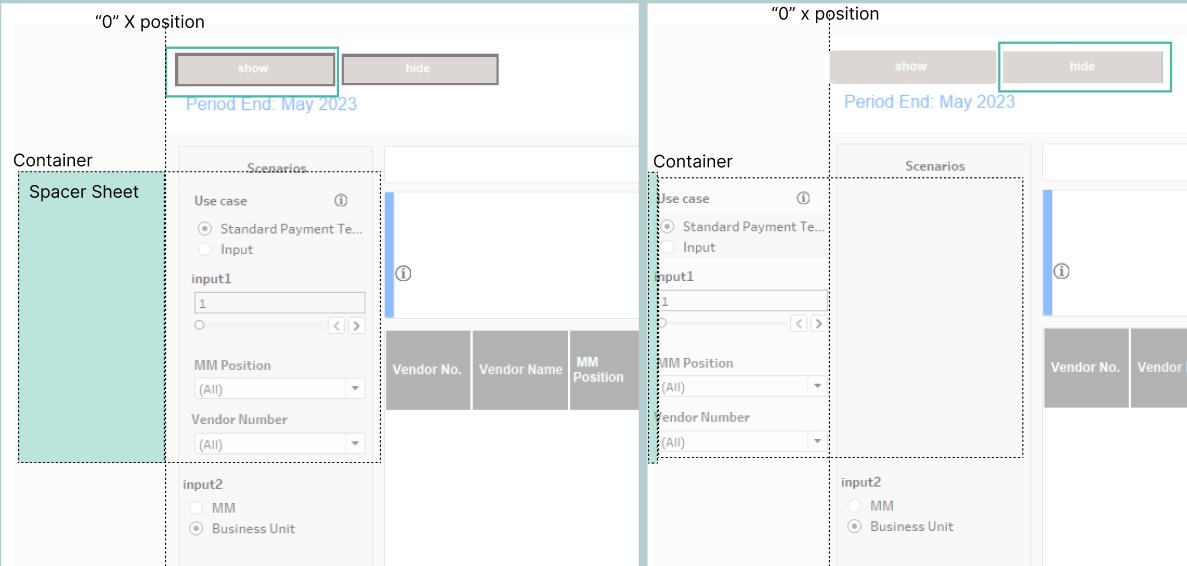
Use a Tableau parameter to show and hide filters, No “Blank” cover-up.
1. Create a “spacer” sheet that expands when parameter = “show”.
2. Make the container x position equal to -150.
This approach allows us to reuse the parameter rather than the native “show and hide” button. This trick can now be done using Dynamic Zone Visibility (DZV), but it is nice to have it in your back pocket.
Kudos to Viral Patel, who was inspired by @VizGenie‘s off-canvas tip.
Credit: Candice Che
 Michael Sandberg's Data Visualization Blog